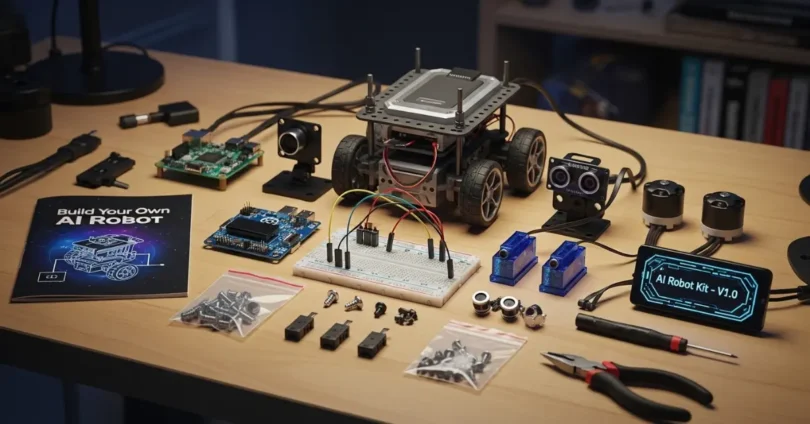
An AI Robot Kit is the perfect way to start your journey into the world of robotics and artificial intelligence. These kits come with all the tools, sensors, and parts you need to build a smart robot that can move, sense its environment, and even learn from it. Whether you are a student, a beginner, or just a tech enthusiast, an AI Robot Kit makes learning programming, electronics, and AI fun and easy.
Types of AI Robot Kits
AI Robot Kit come in many types depending on your skills, goals, and age. Understanding the types helps you choose the right kit.
- Beginner Kits: These kits are simple to assemble and require no prior programming experience. They often come with easy-to-follow instructions and visual programming tools.
- Advanced Kits: Designed for students or hobbyists with some coding experience. They include more components, advanced sensors, and programming flexibility.
- Specialized Kits: Focused on specific applications like AI learning, STEM projects, or robotics competitions. They may include features like machine learning algorithms or complex sensors.
Comparison Table: Beginner vs Advanced vs Specialized
| Feature | Beginner Kit | Advanced Kit | Specialized Kit |
| Programming Skill Required | Low | Medium | High |
| Number of Components | 10–20 | 20–50 | 50+ |
| AI Features | Basic | Moderate | Advanced |
| Price Range | $20–$50 | $50–$150 | $150+ |
Key Components of an AI Robot Kit
Every AI Robot Kit comes with several essential parts. Knowing these components helps you understand how your robot works.
- Microcontrollers and Processors: The brain of the robot, like Arduino, Raspberry Pi, or ESP32.
- Sensors: Detect environmental changes, including:
- Motion sensors
- Light sensors
- Temperature sensors
- Distance sensors
- Motors and Actuators: Allow the robot to move, rotate, or perform tasks.
- Connectivity Modules: Bluetooth, Wi-Fi, or IR modules help your robot communicate with devices.
- Power Sources: Rechargeable batteries or battery packs provide energy for the robot.
- Chassis and Structural Parts: Frames, wheels, and holders that give the robot shape and stability.
How AI Robot Kits Work
Understanding how AI Robot Kits function helps you get the most out of your kit.
- Hardware Setup: You assemble sensors, motors, and microcontrollers to create the robot.
- Programming: Using coding tools, you tell the robot how to respond to different inputs.
- AI Integration: Some advanced kits allow machine learning where robots learn from data and adjust their behavior.
- Testing: You run programs to check if the robot performs as expected.
The combination of hardware and software lets the robot perform tasks like obstacle avoidance, line following, or voice commands.
Benefits of Using AI Robot Kits
AI Robot Kits offer multiple benefits for learners of all ages:
- Educational Advantages: Enhances STEM skills, coding, and electronics knowledge.
- Hands-On Learning: Makes abstract concepts easy to understand through practice.
- Problem-Solving Skills: Encourages critical thinking and creativity.
- Career Preparation: Prepares students for future careers in robotics and AI.
- Fun and Engagement: Learning becomes interactive and enjoyable.
Guide to Building Your First AI Robot
1: Unboxing and Checking Components
- Open your kit carefully.
- Verify all components are included according to the manual.
- Organize components into groups (sensors, motors, controllers).
2: Assembling the Hardware
- Attach motors and wheels to the chassis.
- Install sensors in the correct positions.
- Connect all parts to the microcontroller following the wiring guide.
3: Installing Software and Drivers
- Download the recommended software from the kit’s website.
- Install necessary drivers for microcontrollers.
- Ensure your computer can communicate with the robot hardware.
4: Writing Your First Program
- Beginners can use visual programming tools like Scratch or Blockly.
- Advanced users can code in Python or C/C++.
- Example: Making the robot move forward for 5 seconds and stop.
5: Testing the Robot
- Run your program.
- Observe if the robot performs tasks correctly.
- Make adjustments as needed.
6: Debugging Common Issues
- Check wiring connections.
- Ensure batteries are charged.
- Verify code syntax.
- Calibrate sensors if necessary.
7: Enhancing Your Robot with AI Features
- Add obstacle detection using sensors.
- Implement line-following algorithms.
- Experiment with voice or gesture recognition if supported.
Programming Languages Commonly Used in AI Robot Kits
Different kits use different programming languages based on complexity:
- Python: Popular for AI and robotics projects.
- Scratch / Blockly: Visual programming, ideal for beginners.
- C / C++: Used for low-level hardware control.
- JavaScript: Some web-based kits use this for coding.
Real-Life Applications of AI Robot Kits
AI Robot Kits are not just toys they have practical applications:
- Educational Projects: Schools and universities use them to teach coding and robotics.
- Home Automation Experiments: Control lights, doors, or appliances.
- Competitions: Robotics competitions challenge students to solve tasks using AI.
- AI Learning: Experiment with machine learning and AI algorithms on small-scale robots.
Common Challenges and How to Solve Them
- Hardware Issues: Loose connections or broken components.
- Solution: Check wiring and test components individually.
- Software Errors: Program not running as expected.
- Solution: Debug step by step, check syntax, and consult manuals.
- Sensor Calibration Problems: Sensors giving inaccurate readings.
- Solution: Calibrate sensors according to instructions.
- Connectivity Issues: Robot not connecting to computer or app.
- Solution: Check Bluetooth/Wi-Fi settings, update firmware.
- Battery Problems: Robot stops unexpectedly.
- Solution: Ensure batteries are fully charged or replace them.
Common FAQs About AI Robot Kit
Faqs of AI Robot Kit:
Do I need prior coding experience to use an AI Robot Kit?
No, many kits are designed for beginners with visual programming tools.
Which AI Robot Kit is best for beginners?
Kits with fewer components and easy instructions like Arduino beginner kits are ideal.
Can I program AI features on a beginner robot?
Yes, some beginner kits allow simple AI tasks like obstacle detection.
Are AI Robot Kits expensive?
Prices range from $20 to over $300 depending on complexity.
What age is suitable for AI Robot Kits?
Most kits are suitable for ages 8 and above, but some advanced kits are for teens and adults.
Do I need a computer to program the robot?
Yes, a computer or tablet is usually required to write and upload programs.
Can I expand my AI Robot Kit?
Many kits allow additional sensors or modules to enhance functionality.
How long does it take to build a robot?
Simple robots can be assembled in 1–2 hours; advanced robots may take several days.
Are AI Robot Kits safe for children?
Yes, if used according to instructions and with adult supervision for younger kids.
Can AI Robot Kits help me in my career?
Yes, they teach skills like coding, electronics, and problem-solving which are valuable for future tech careers.
Conclusion
An AI Robot Kit is an exciting and educational tool for learners of all ages. It teaches programming, robotics, and AI in a hands-on way while developing problem-solving skills and creativity. Whether you are a beginner or an advanced learner, there is an AI Robot Kit suitable for you. Start with small projects, explore programming, and gradually build complex robots. With patience, practice, and curiosity, your AI Robot Kit can become a gateway to a future in robotics and technology.