Quick Answer: Better category navigation in Magento 2 comes down to three things: smart product filtering, clear product labels, and a fast checkout experience. When all three work together, shoppers find what they need faster and are far more likely to complete their purchase.
If you have ever visited an online store and felt frustrated trying to find the right product, you are not alone. Research from the Baymard Institute shows that 68% of users will abandon a website if they cannot find products easily. In eCommerce, poor navigation is one of the biggest silent killers of sales.
This article walks you through exactly how to improve your Magento 2 store’s category navigation, using proven tools and practical strategies that any store owner can apply, regardless of technical experience.
Key Takeaways
- Poor category navigation causes high bounce rates and lost sales
- AJAX-powered Magento 2 filtering lets customers find products faster without page reloads
- Product labels use visual cues to highlight your best products and promotions automatically
- A one-step checkout removes the final barrier between a shopper’s intent and a completed sale
- Amasty provides purpose-built extensions for all three of these areas, backed by years of Magento expertise
- The biggest gains come when filtering, labeling, and checkout are optimized together, not in isolation
Why Category Navigation Matters More Than You Think
When a visitor lands on your category page, they are already interested in buying. The question is whether your store makes it easy enough for them to say yes.
Bad navigation creates friction. Good navigation removes it.
A well-organized category page does three things at once:
- It helps shoppers quickly narrow down a large product catalog
- It shows them the most relevant products based on their preferences
- It keeps them engaged long enough to make a purchase decision
Key Insight: According to a study by Forrester Research, a well-designed user interface can increase a website’s conversion rate by up to 200%. For eCommerce stores, category navigation is at the heart of that user interface.
The Three Pillars of Better Magento 2 Category Navigation
Before diving into specific tools, it helps to understand the three things that work together to create a smooth shopping experience:
- Smart filtering so shoppers can sort and narrow products by the attributes that matter to them
- Clear product labeling so shoppers can instantly see what is new, on sale, or a bestseller without reading every product description
- A fast checkout so the effort shoppers put into finding the right product does not go to waste at the final step
Each of these is something Amasty, one of the most experienced and trusted Magento development companies in the ecosystem, has spent years refining into purpose-built extensions.
Step 1: Set Up Powerful Product Filtering with Magento 2 Filter
The single most impactful change you can make to your category navigation is adding a proper filtering system.
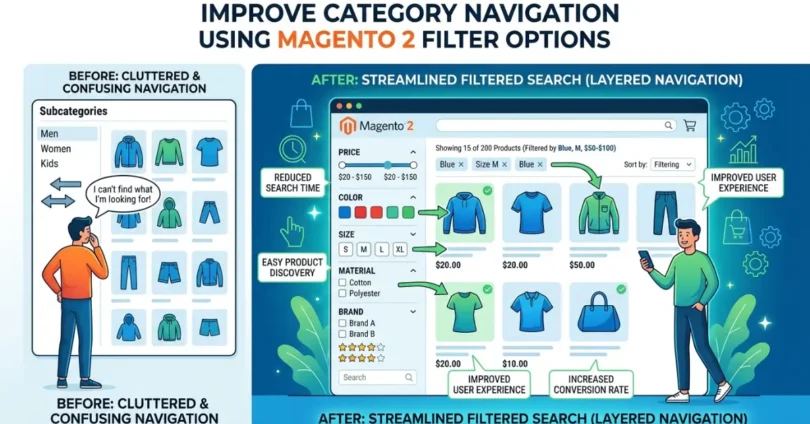
By default, Magento 2 includes basic layered navigation. It works, but it has limitations: no AJAX loading, limited customization, no price sliders, and no multi-select support. For most modern online stores, this is not enough.
A robust magento 2 filter solution from Amasty solves all of these problems in one extension. The Improved Layered Navigation for Magento 2 lets you:
- Filter by any product attribute including size, color, material, brand, and price range
- Use AJAX technology so the page updates instantly when a filter is applied, without a full page reload
- Enable multi-select filtering so shoppers can choose multiple values in the same filter at once (for example, “Red” AND “Blue”)
- Display a price slider so customers can drag a range instead of selecting preset brackets
- Show filters vertically or horizontally depending on your store layout and device type
- Auto-generate SEO-friendly URLs for each filter combination, helping your category pages rank in search engines
Real-World Example: How Filtering Improves Conversions
Imagine a clothing store with 500 products in its “Women’s Tops” category. Without filters, a shopper has to scroll through hundreds of items. With proper filters for size, color, sleeve length, and price, that same shopper can get to a shortlist of 8 to 12 relevant products in under 30 seconds.
That kind of speed and relevance is what converts browsers into buyers. Studies consistently show that stores with advanced filtering see 20 to 30 percent lower bounce rates on category pages compared to stores with basic navigation.
Key Features of a Strong Magento 2 Filter Setup
| Feature | Benefit |
| AJAX instant filtering | No page reloads, faster experience |
| Multi-select attributes | More flexible search for customers |
| Price slider | Intuitive price range selection |
| SEO-friendly filter URLs | Better search engine visibility |
| Vertical and horizontal display | Flexible layout for any store design |
| Filter analytics | Understand which filters shoppers use most |
Step 2: Use Magento Product Tags and Labels to Guide Shoppers Visually
Good filters help shoppers narrow down products. But once they are looking at a category page, they need quick visual signals to understand which products deserve their attention.
This is where magento product tags and product labels come in. The Amasty Product Labels extension lets you add eye-catching badges directly onto product images and category listings.
These labels can say things like:
- “New Arrival”
- “Best Seller”
- “On Sale”
- “Free Shipping”
- “Limited Stock”
- “20% Off”
Why Product Labels Work
Human eyes are drawn to color and contrast before they read text. A small badge in the corner of a product image can be the difference between a shopper pausing to look at a product and scrolling right past it.
According to behavioral research from Nielsen Norman Group, visual cues like badges and labels are processed by the brain up to 60,000 times faster than plain text. In a category page with dozens of products, the right label makes certain products immediately stand out.
What Makes Amasty’s Product Labels Solution Different
The Amasty approach to product labeling is flexible and rule-based, meaning labels can be applied automatically based on conditions you set rather than manually tagging each product.
For example, you can set a rule that says: “Show a ‘Sale’ label on any product where the current price is lower than the original price.” The extension calculates this automatically and applies the label across your entire catalog.
Other capabilities include:
- Showing different labels to different customer groups (for example, a “Wholesale” badge for registered wholesale buyers)
- Setting time-limited labels for seasonal promotions
- Displaying labels on cart pages, mini-cart, and checkout pages for reinforcement
- Supporting both text labels and custom image labels
- Limiting how many labels appear on a single product to avoid visual clutter
- AI-powered label image generation via ChatGPT integration
This level of control turns a simple visual feature into a genuine merchandising tool.
Step 3: Complete the Experience with a Streamlined Checkout Magento 2
Here is a problem many store owners overlook: you can have perfect category navigation and beautiful product labels, but if your checkout process is clunky, you lose the sale anyway.
The default Magento 2 checkout takes shoppers through multiple pages and steps. Every additional step is an opportunity for the customer to change their mind and leave. Industry data from the Baymard Institute puts the average cart abandonment rate at 70.19 percent, and a complicated checkout process is one of the top five reasons shoppers abandon.
A proper checkout magento 2 solution by Amasty collapses the entire process into a single screen. Shipping, billing, payment, and order review all appear at once, so the customer only needs to fill in their information once and click one button.
Key benefits of a one-step checkout approach include:
- Guest checkout support so customers do not need to create an account to buy
- Auto-fill and address validation to reduce errors and speed up entry
- Customizable layout so the checkout page matches your store’s branding
- Support for discount codes, gift cards, and multiple payment methods all on one screen
- Mobile-optimized design because a growing share of purchases happen on phones
Case Study: The Impact of Simplifying Checkout
A Magento-based fashion retailer that moved from a multi-step checkout to a one-page checkout reported a 35 percent reduction in checkout abandonment within the first three months. The change required no changes to their catalog or marketing, only a streamlined checkout experience.
This kind of result is not unusual. A checkout that respects the customer’s time converts significantly better than one that asks for the same information across three or four separate pages.
How These Three Tools Work Together
Here is the full picture of how smart navigation, product labeling, and a fast checkout combine into a high-converting experience:
- A shopper arrives on your category page and uses the Magento 2 filter to narrow 300 products down to 12 that match their size, color, and budget
- On that filtered list, product labels from the Amasty Product Labels extension immediately highlight a product as “Best Seller” and another as “Free Shipping”
- The shopper adds the best-seller to their cart and completes the purchase on a single-screen checkout without creating an account or jumping through multiple pages
Every part of this journey reduces friction and builds confidence. The result is more completed purchases and fewer abandoned sessions.
Practical Tips for Optimizing Your Magento 2 Category Pages
Beyond the tools themselves, here are actionable habits that improve category navigation for any Magento 2 store:
- Audit your product attributes first. Good filters are only useful if your product data is clean and consistent. Make sure size, color, material, and other attributes are filled in correctly for every product.
- Prioritize filters by what shoppers actually care about. Use filter analytics to see which filters get used most and put those at the top.
- Do not overload the filter panel. Showing 20 filter options at once is overwhelming. Show the most important ones by default and let users expand to see more.
- Test your labels on mobile. Labels that look great on desktop can overlap or get too small on a phone screen. Always check the mobile view.
- Keep your checkout form short. Only ask for information you actually need. Every extra field is a reason to abandon.
- Review your navigation quarterly. Shopper preferences and your catalog both change over time. What worked six months ago may not be optimal today.
About Amasty
Amasty is one of the most established and respected names in the Magento extension ecosystem, with over a decade of experience building high-quality modules for Magento 1 and Magento 2 stores. Their extensions are used by thousands of eCommerce businesses worldwide, from independent shops to enterprise-level operations. Amasty’s approach combines technical depth with practical usability, and their team provides consistent support and updates to keep extensions compatible with the latest Magento releases.
Frequently Asked Questions
What is layered navigation in Magento 2?
Layered navigation is the filter panel that appears on category pages, allowing shoppers to narrow down products by attributes like price, color, size, and more. Magento 2 includes basic layered navigation by default, but advanced extensions like those from Amasty add AJAX loading, multi-select, price sliders, and SEO-friendly URLs.
How do Magento 2 product labels increase sales?
Product labels add visual badges like “New,” “Sale,” or “Best Seller” directly onto product images. These badges draw the shopper’s eye to specific products and communicate key selling points at a glance, which increases click-through rates and purchase likelihood without requiring any changes to product descriptions.
Why does the checkout process affect category navigation?
Category navigation and checkout are parts of the same customer journey. If a shopper successfully finds the right product but encounters a slow or confusing checkout, all the effort spent on navigation is wasted. Optimizing the full journey, from discovery to purchase, produces better results than improving any single step alone.
Can these extensions work together on the same Magento 2 store?
Yes. Amasty builds its extensions to be compatible with each other and with standard Magento 2 installations. The Improved Layered Navigation, Product Labels, and One Step Checkout extensions can all run on the same store without conflicts, and they are regularly updated for compatibility with the latest Magento releases.
Is it necessary to have technical knowledge to use these extensions?
Amasty extensions are designed with store owners in mind, not just developers. The admin panels are straightforward and include detailed documentation. That said, for initial installation and any custom configuration, working with a Magento developer or Amasty’s support team is recommended to get the best results.
How does AJAX filtering improve the shopping experience?
Without AJAX, every time a shopper selects a filter, the entire page reloads. This adds one to three seconds of wait time per filter action. With AJAX, the product grid updates instantly without a full reload. For a shopper applying three or four filters to find the right product, this saves significant time and makes the experience feel much smoother and faster.